schema 教程
发表时间:2022-03-24来源:网络
快速开始
我们用一个例子来介绍说明 JSON Schema,虽然不可能面面俱到,但是对JSON Schema的基本概念、语法、使用有个较为全面的了解是完全没问题的。
这里假设我们有一个产品类目接口是用JSON Data格式来交互的,这个类目的产品信息字段有:
产品ID:productId
产品的名称:productName
产品的销售价格:price
可选字段的产品标签:tags
产品类目数据简单例子:
{ "productId": 1, "productName": "A green door", "price": 12.50, "tags": [ "home", "green" ] }当你看到这个产品类目JSON Data数据时,你是不是有一些疑问,比如:
产品ID字段是啥,整型?长整型?
产品的名称字段是必填的吗。
价格字段可以是零吗,或者小数点精度是几位呢。
产品标签字段都是字符串类型吗。
为了解决这些问题,我们需要使用元规则对这些字段进行定义解释、数据验证。JSON Schema就是这么一个帮助我们解决这些问题的工具,它符合IETF标准。
1、开始使用schema
描述JSON Schema文档的格式可以是JSON,也可以是xml,这里以JSON为例。因此要特别要区分JSON Data 与JSON Schema的关系,JSON Schema是对JSON Data字段的定义解释、数据校验。
接下来,我们从一个基础的JSON schema开始,了解其几个关键字
{ "$schema": "https://json-schema.org/draft/2020-12/schema", "$id": "https://example.com/product.schema.json", "title": "Product", "description": "A product in the catalog", "type": "object" }$schema关键字:用于描述JSON schema满足特定草案标准的版本,一般用于版本控制
$id关键字:定义了一个URL,类似于身份id,可以用于对当前或其他JSON schema文档的引用
title和description关键字:没有包含到数据校验里面去,仅仅用于描述
type关键字:是对JSON Data文档格式的约束,这个例子中要求的是一个JSON Object
这里涉及了JSON Schema三种概念术语: Schema的属性关键字、Schema的注释关键字、Schema的数据校验关键字,后面都是围绕着这几个概念的关键字展开。
1.1、JSON Data 属性定义
productId是一个数值型的字段,由于它是产品的身份标识,因此它也是唯一必填的
我们上面的JSON schema例子进行拓展,增加属性关键字来对productId解释说明
properties关键字:用于对JSON Data的字段进行描述、解释。这里增加了对productId、pruductName字段的描述、类型限制
required关键字:是一个list,用于声明JSON Data字段是否必填,这里增加productId、pruductName校验
{ "$schema": "https://json-schema.org/draft/2020-12/schema", "$id": "https://example.com/product.schema.json", "title": "Product", "description": "A product from Acme's catalog", "type": "object", "properties": { "productId": { "description": "The unique identifier for a product", "type": "integer" } }, "required": [ "productId" ] }1.2、进一步理解属性
在产品品类中,价格不可能为0,于是我们加入price字段的限制
prince字段不仅用description和type字段描述,还引入了exclusiveMininum关键字来保证price大于0,要是想实现大于等于0,可以用mininum关键字来实现
{ "$schema": "https://json-schema.org/draft/2020-12/schema", "$id": "https://example.com/product.schema.json", "title": "Product", "description": "A product from Acme's catalog", "type": "object", "properties": { "productId": { "description": "The unique identifier for a product", "type": "integer" }, "productName": { "description": "Name of the product", "type": "string" }, "price": { "description": "The price of the product", "type": "number", "exclusiveMinimum": 0 } }, "required": [ "productId", "productName", "price" ] }接下来我们对产品标签tags字段也来做一些限制:
如果产品有标签,那么至少有一个标签
所有的标签在同一个产品里是唯一的
所有的标签类型是字符串类型
产品标签字段对于产品来说不是必须的
因此
tags的字段类型应是array
tags的每一细项的类型应是string
minItems关键字用于保证至少有一个标签
uni关键字用于保证标签在同一个产品里面是唯一的
由于产品标签字段tags不是必填的,所有在required里面没有tags字段
{ "$schema": "https://json-schema.org/draft/2020-12/schema", "$id": "https://example.com/product.schema.json", "title": "Product", "description": "A product from Acme's catalog", "type": "object", "properties": { "productId": { "description": "The unique identifier for a product", "type": "integer" }, "productName": { "description": "Name of the product", "type": "string" }, "price": { "description": "The price of the product", "type": "number", "exclusiveMinimum": 0 }, "tags": { "description": "Tags for the product", "type": "array", "items": { "type": "string" }, "minItems": 1, "uni": true } }, "required": [ "productId", "productName", "price" ] }2、嵌套化JSON Data数据
到此为止,我们一直在处理一个非常扁平的模式--只有一个层次,我们更深入一点。这里展示如何使用嵌套数据结构,因此我们引入产品尺寸字段,而尺寸字段则包含长、宽、高三个字段。可以清晰看到,这里的嵌套使用与外层结构大同小异。
{ "$schema": "https://json-schema.org/draft/2020-12/schema", "$id": "https://example.com/product.schema.json", "title": "Product", "description": "A product from Acme's catalog", "type": "object", "properties": { "productId": { "description": "The unique identifier for a product", "type": "integer" }, "productName": { "description": "Name of the product", "type": "string" }, "price": { "description": "The price of the product", "type": "number", "exclusiveMinimum": 0 }, "tags": { "description": "Tags for the product", "type": "array", "items": { "type": "string" }, "minItems": 1, "uni": true }, "dimensions": { "type": "object", "properties": { "length": { "type": "number" }, "width": { "type": "number" }, "height": { "type": "number" } }, "required": [ "length", "width", "height" ] } }, "required": [ "productId", "productName", "price" ] }3、引用外部的JSON Schema
到目前为止,我们的JSON模式是完全自包含的。为了重复使用、可读性和可维护性等原因,在许多数据结构中共享JSON Schema是非常常见的。
在这个例子中,我们引入了一个新的JSON Schema资源来表示产品的地理位置信息。这里不仅使用前面提到的最小验证关键字,还增加了最大验证关键字。结合起来,这些给了我们一个用于验证的范围。
{ "$id": "https://example.com/geographical-location.schema.json", "$schema": "https://json-schema.org/draft/2020-12/schema", "title": "Longitude and Latitude", "description": "A geographical coordinate on a planet (most commonly Earth).", "required": [ "latitude", "longitude" ], "type": "object", "properties": { "latitude": { "type": "number", "minimum": -90, "maximum": 90 }, "longitude": { "type": "number", "minimum": -180, "maximum": 180 } } }接下来,我们对这个新JSON Schema添加一个引用,以便它能被纳入到原来的JSON Schema中。
{ "$schema": "https://json-schema.org/draft/2020-12/schema", "$id": "https://example.com/product.schema.json", "title": "Product", "description": "A product from Acme's catalog", "type": "object", "properties": { "productId": { "description": "The unique identifier for a product", "type": "integer" }, "productName": { "description": "Name of the product", "type": "string" }, "price": { "description": "The price of the product", "type": "number", "exclusiveMinimum": 0 }, "tags": { "description": "Tags for the product", "type": "array", "items": { "type": "string" }, "minItems": 1, "uni": true }, "dimensions": { "type": "object", "properties": { "length": { "type": "number" }, "width": { "type": "number" }, "height": { "type": "number" } }, "required": [ "length", "width", "height" ] }, "warehouseLocation": { "description": "Coordinates of the warehouse where the product is located.", "$ref": "https://example.com/geographical-location.schema.json" } }, "required": [ "productId", "productName", "price" ] }至此,我们通过产品品类这个较为全面的例子,对JSON Schema的主要概念已经来阐述清晰了,下面是一个匹配该JSON Schema的JSON Data样例:
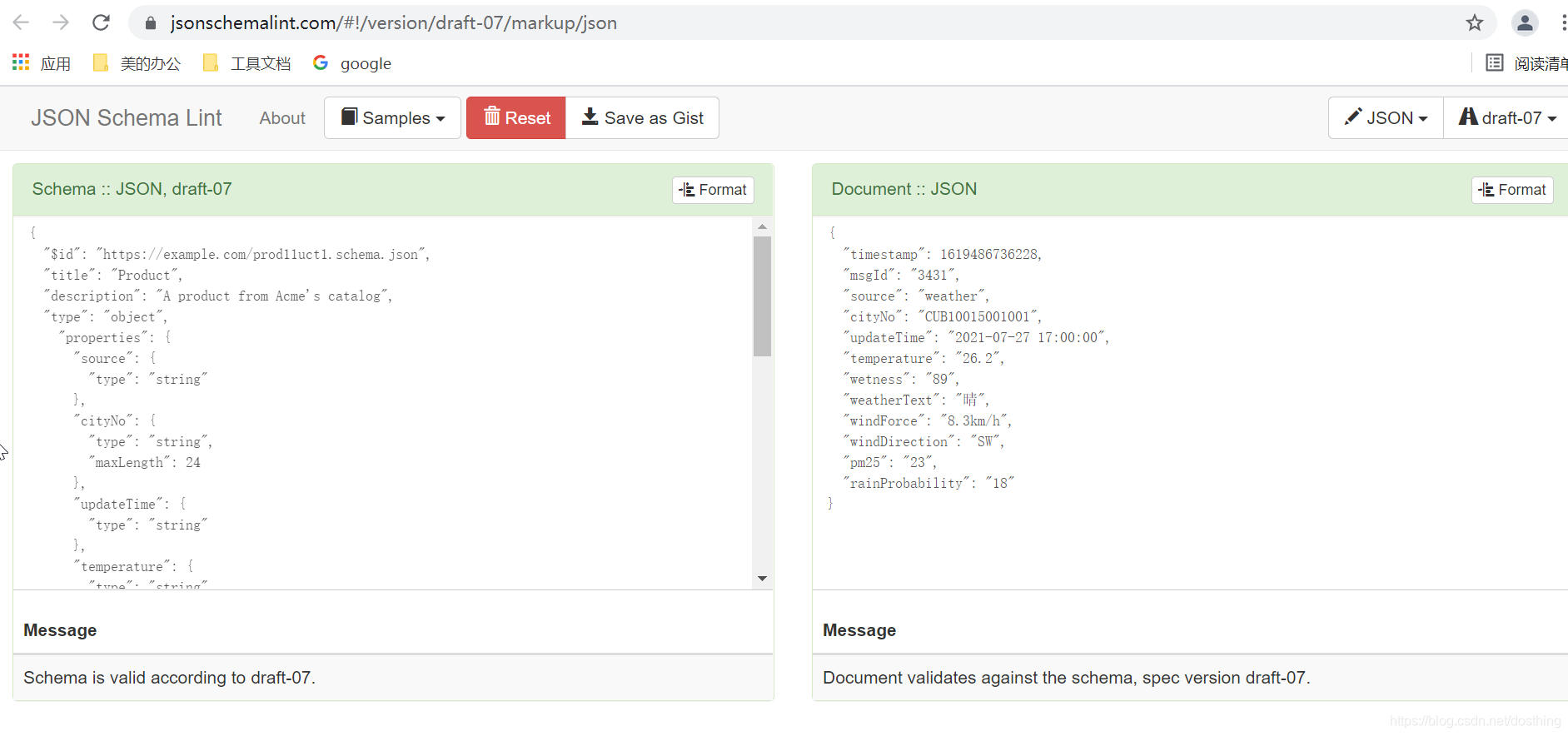
{ "productId": 1, "productName": "An ice sculpture", "price": 12.50, "tags": [ "cold", "ice" ], "dimensions": { "length": 7.0, "width": 12.0, "height": 9.5 }, "warehouseLocation": { "latitude": -78.75, "longitude": 20.4 } }一个在线验证工具 https://jsonschemalint.com/
参考:
JSON Schema 关键字
关键字语法
知识阅读


软件推荐
更多 >-
 查看
查看皓盘云建最新版下载v9.0 安卓版
53.38MB |商务办公
-
 查看
查看ris云客移动销售系统最新版下载v1.1.25 安卓手机版
42.71M |商务办公
-
 查看
查看粤语翻译帮app下载v1.1.1 安卓版
60.01MB |生活服务
-
 查看
查看人生笔记app官方版下载v1.19.4 安卓版
125.88MB |系统工具
-
 查看
查看萝卜笔记app下载v1.1.6 安卓版
46.29MB |生活服务
-
 查看
查看贯联商户端app下载v6.1.8 安卓版
12.54MB |商务办公
-
 查看
查看jotmo笔记app下载v2.30.0 安卓版
50.06MB |系统工具
-
 查看
查看鑫钜出行共享汽车app下载v1.5.2
44.7M |生活服务
精选栏目
热门推荐


-
1
 联想笔记本电脑清理灰尘详细步骤
2022-03-26
-
2
 神舟bios设置图解教程
2022-03-26
-
3
 联想拯救者R7000 2020款清灰教程及对硅脂or导热垫选择参考建议
2022-03-26
-
4
 ACPI是什么?BIOS中怎么设置ACPI?
2022-03-26
-
5
 联想ThinkPad笔记本win10改win7系统及BIOS设置图文教程
2022-03-26
-
6
 联想ThinkPad笔记本装win10系统及bios设置教程(附带分区教程)
2022-03-26
-
7
 鸿蒙系统能安装vscode吗
2022-03-26
-
8
 192.168.1.62登录入口管理网址
2022-03-26
-
9
 fast路由器设置网址192.168.1.1,falogin.cn密码
2022-02-15
-
10
 联想笔记本装系统怎么进入PE图文教程
2022-02-14


-
1

-
2
机器人战斗竞技场手机版下载v3.71 安卓版
其它手游 -
3
果冻人大乱斗最新版下载v1.1.0 安卓版
其它手游 -
4
王者100刀最新版下载v1.2 安卓版
其它手游 -
5
trueskate真实滑板正版下载v1.5.102 安卓版
其它手游 -
6
矢量跑酷2最新版下载v1.2.1 安卓版
其它手游 -
7
休闲解压合集下载v1.0.0 安卓版
其它手游 -
8
指尖游戏大师最新版下载v4.0.0 安卓版
其它手游 -
9
飞天萌猫下载v3.0.3 安卓版
其它手游 -
10
火柴人越狱大逃脱下载v1.1 安卓版
其它手游